
8 Active Budgetvm.com Deals in Review
Save $60 Monthly Forever on Powerful Dual Xeon Servers
Get instant savings of $60 per month for life on dual Intel Xeon 2620 servers at BudgetVM.com now!Click to copy & open site
Unleash Powerful Performance with Monthly Savings of $30 on Xeon E3-1230!
Experience significant monthly savings of $30 on your powerful Xeon E3-1230 at BudgetVM.com. Upgrade now and harness the performance you need!Click to copy & open site
Save 50% on Premium Cloud Hosting
Enjoyhigh-performance cloud hosting for less with this special offer from BudgetVM. Get 50% off your first month onall new cloud server orders. Upgrade your infrastructure tod, ...Click to copy & open site
Lifetime $40 OffIntel Xeon Hosting
Supercharge your digital infrastructure with the high-performance Intel Xeon 1270 atBudgetVM.com. Grab this exclusive chance to save $40 every month for life, ensuring elite h, ...Click to copy & open site
Save $50 on Ryzen Server Packages
Unlock incredible savings! Get $50 off64GB DDR5 AMD RYZEN 9900x and 128GB DDR5 AMD RYZEN 9950x server packages. Click now to claim your discount at BudgetVM.com!Click to copy & open site
Premium Dedicated Servers: Unbeatable Deals on AMD Ryzen and Epyc
Experience top-tier performance with our dedicated servers featuring AMD Ryzen 9900X, 9950X, or dual Epyc 7451 processors. Enjoy fast setup, premium network, and storage optio, ...Click to open site
Unbeatable Dedicated Server Deals Now!
Get top-notch servers starting at $99/month: AMD Ryzen 9900X with 64GB DDR5 and 1TB NVMe, or upgrade to the Ryzen 9950X with 128GB DDR5 for $199/month. Even more power comes w, ...Click to open site
High-Performance Dedicated Servers From $20
Experience lightning-fast deploymentwith our premium dedicated servers. Choose from powerful configurations: Ryzen 9900X for $99/mo, Ryzen9950X for $199/mo, or Dual Epyc 7451s, ...Click to open site
Checkout Steps for a Budget VM coupon code
Configure the server first, then compare the listing’s product, eligibility, billing term, and displayed discount against your intended BudgetVM order.
- Copy the coupon code exactly as shown, avoiding spaces or substitutions that can stop the checkout field from recognizing the entry.
- Select the required CPU, RAM, storage, operating system, and related options before applying the code on the configuration screen.
- Confirm the discount changes the final cart total, then read first-term and renewal pricing before submitting payment.
If a Budget VM coupon code Fails at Checkout
A missing discount usually reflects product eligibility, billing terms, code accuracy, or an expired editorial entry rather than a configuration problem alone.
- Compare the selected server with the listing title and conditions, because SLICK60, SLICK30, SLICKCLOUD, and SLICK40 reference different products or order types.
- Delete the entry, re-copy the coupon code, and apply it again without extra spaces; then check whether the cart visibly recalculates before continuing.
- If the total remains unchanged, review customer eligibility and renewal terms on the provider’s checkout page, then choose another verified listing instead of paying unexpectedly.
Handpicked Budget VM Coupon Shortlist
This quick table gives you a cleaner view of Budgetvm.com discount codes. It tracks 8 active entries, calls out Dedicated Server or VPS Hosting-related picks where possible, and keeps the best verified saving, 50% Off, near the newest coupon: Save $60 Monthly Forever on Powerful Dual Xeon Servers.
| Offer | Offer Details | Type |
|---|---|---|
| $60 Off | Save $60 Monthly Forever on Powerful Dual Xeon Servers | COUPON |
| $30 Off | Unleash Powerful Performance with Monthly Savings of $30 on Xeon E3-1230! | COUPON |
| 50% Off | Save 50% on Premium Cloud Hosting | COUPON |
| $40 Off | Lifetime $40 OffIntel Xeon Hosting | COUPON |
| $50 OFF | Save $50 on Ryzen Server Packages | Coupon |
| From $20 | Premium Dedicated Servers: Unbeatable Deals on AMD Ryzen and Epyc | Services |
| From $20 | Unbeatable Dedicated Server Deals Now! | Services |
| From $20 | High-Performance Dedicated Servers From $20 | Services |
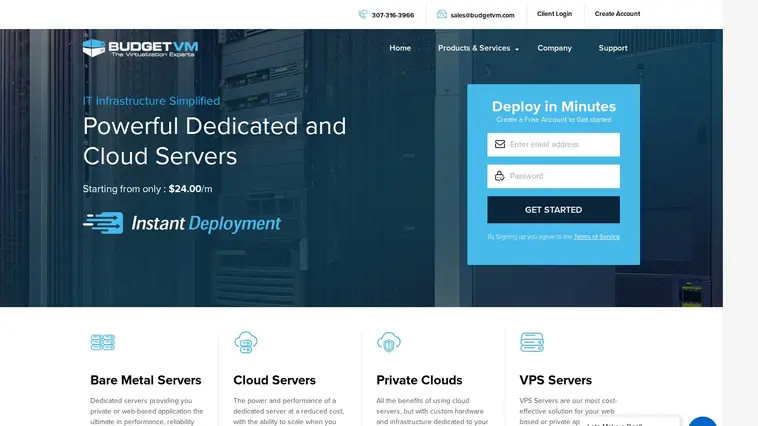
Budget VM website preview
Budget VM Infrastructure Guide for Dedicated Server
BudgetVM covers several infrastructure needs, from bare metal servers and cloud servers to private clouds and VPS servers. The useful choice is rarely the cheapest line on the page. It is the configuration that gives your application enough processing power, memory, storage, network capacity, and operating-system flexibility without paying for resources that will sit idle.
Our editorial listings help narrow the comparison. Treat Save $60 Monthly Forever on Powerful Dual Xeon Servers and similar entries as starting points, then verify the final configuration, eligibility, billing term, and cart total on the provider’s checkout page. That pause matters when an attractive monthly figure applies only to a particular server model or initial billing period.
Match server type to the workload
Bare metal servers suit applications that need private hardware, strong input/output performance, substantial memory, or dedicated processing resources. A database with sustained disk activity, a busy web application, or a game server may benefit from avoiding the resource-sharing limits associated with smaller virtual environments. BudgetVM describes its bare metal range as tailored for demanding private or web-based applications.
Processor choice should follow the workload rather than the headline specification. The editorial listings mention AMD Ryzen 9900X, Ryzen 9950X, Dual AMD Epyc 7451, Intel Xeon E3-1230, Intel Xeon 1270, and Dual Intel Xeon 2620 configurations. Ryzen options can make sense when fast single-thread performance matters; higher-core Epyc or dual-Xeon systems may better suit parallel workloads. Check memory and storage alongside the CPU, since a powerful processor cannot compensate for insufficient RAM or slow storage.
Cloud servers fit applications that need dedicated resources with more flexibility as demand changes. BudgetVM describes them as a lower-cost alternative to dedicated hardware with the ability to scale when needed. That can suit an application facing uneven traffic, a growing store, or a project still finding its steady resource level. Compare the scaling model, storage allocation, and recurring price before deciding that cloud is automatically cheaper.
Private clouds target businesses wanting cloud-style flexibility with custom hardware and infrastructure dedicated to their operation. They may be excessive for a small site but reasonable when resource availability, isolation, or control carries more weight than the lowest entry price. VPS servers remain the practical starting point for lower-resource applications and tighter budgets, using similar virtualization technology with smaller allocations. A simple company site or development environment may not need a dedicated server at all.
Check infrastructure details before applying an offer
BudgetVM states that its dedicated servers use a 2,000 Gbps network and receive protection through an 1,800+ Gbps DDoS mitigation system. The provider also describes average deployment in under ten minutes, with the operating system installed and network configured. These claims help frame the service, but they do not remove the need to check the specific server’s availability, location, bandwidth terms, and included features during configuration.
Operating-system choices listed by the provider include CentOS, Debian, Ubuntu, Windows Server, Scientific Linux, Proxmox, Xenserver, and VMware ESXi, with 32-bit and 64-bit options referenced. Select the system your software supports before reaching the payment step. Virtualization users should confirm compatibility with the chosen platform, while Windows users should review licensing or related charges rather than assuming every option has the same total cost.
Our page lists offers such as 50% Off, SLICK60, SLICK30, SLICKCLOUD, and SLICK40 for specific editorial entries. Codes are not universal discounts: SLICK60 is listed with Dual Intel Xeon 2620 servers, SLICK30 with Xeon E3-1230, SLICKCLOUD with new cloud-server orders, and SLICK40 with Intel Xeon 1270 hosting. Match the listing to the exact product before copying anything. An offer attached to one CPU family may fail on another, even when both appear under dedicated hosting.
At checkout, configure the CPU, RAM, storage, operating system, and any bandwidth or backup choices first. Enter the coupon code exactly as shown in the relevant listing, then confirm that the discount changes the cart total. Read the billing language carefully: a lifetime monthly reduction differs from a first-term promotion, and the renewal price may not match the initial amount. If the total stays unchanged, remove the code, recheck eligibility, and avoid payment until the displayed terms make sense.
Small technical decisions often matter more than a dramatic percentage label. A startup might prefer VPS hosting and spend less on unused capacity. A database-heavy deployment may justify bare metal with faster storage and more memory. A traffic-sensitive application may value cloud scalability, while a regulated or tightly controlled workload may need private infrastructure. Compare the complete monthly commitment, not only the discount shown in the editorial listing.
BudgetVM Savings Questions
BudgetVM’s infrastructure range covers bare metal servers, cloud servers, private clouds, and VPS servers, so the right choice depends on workload size, growth pattern, control requirements, and budget. The provider describes fast deployment, APEX management, broad operating-system support, a high-capacity network, and DDoS mitigation for relevant services. Our page supplies editorial listings, not brand-side guarantees, so compare each offer with the exact configuration and billing terms shown during checkout. The questions below address practical decisions shoppers commonly face before ordering.