
20 Active Hostodo.com Deals in Review
Get Up to 50% off on many of these products Hostodo
You can reward yourself with a great savings with many services at Hostodo.com! Today you can get top savings when you buy it!
15% immediate discount for any order at Hostodo.com
Get it today, don't wait to search for other promotions Hostodo. If not, you'll regret it.
Today's Top 10 Coupon code!
Oakgen Coupon Code: Just $1999 – Lifetime Access For Just $1,999
Click to open site
PawnHoster Coupon Code: Black Friday: Score 50% Off VPS
Click to copy & open site
Oakgen Coupon Code: Essential Core Features For Just $9/mo
Click to open site
SSDNodes Coupon Code: Save 40% On All Hosting Plans
Click to open site
SugarCalendar Coupon Code: Streamline Scheduling for $49.50/yr
Click to open site
NairaHost Coupon Code: Windows VPS Hosting Starting At $15.75
Click to open site
RackWorks Coupon Code: 30% Off VPS/VDS Lifetime
Click to open site
Oakgen Coupon Code: Save Up To 75% On Lifetime Access
Click to open site
eUKhost Coupon Code: Score 25% Off Servers & Domains!
Click to open site
Anonym-Browser Coupon Code: Scale Multi Platform Ad Campaigns Faster
Click to open site
Checkout Steps for a Hostodo coupon code
Start with the VPS configuration that fits your workload, then compare the listing’s stated terms before applying an offer at checkout.
- Open the selected plan, confirm RAM, storage, virtualization, region, and billing cycle, then copy the coupon code exactly as listed.
- Paste the code into the checkout page without extra spaces, apply it once, and check whether the displayed price changes as expected.
- Before submitting payment, verify the final total, renewal amount, eligibility requirements, and any plan-specific conditions shown by Hostodo.
If a Hostodo coupon code Fails at Checkout
A declined offer usually reflects plan, billing-term, customer-eligibility, or expiry conditions rather than a problem with the VPS itself.
- If the code fails, return to the listing, copy it again, remove surrounding spaces, and confirm that the chosen configuration matches the stated offer.
- If the discount appears smaller than expected, compare monthly versus annual billing, recurring terms, add-ons, taxes, and the provider’s final checkout calculation.
- When the cart still looks wrong, stop payment and contact Hostodo through its own support channels with the plan, region, and displayed error.
Handpicked Hostodo Coupon Shortlist
This quick table gives you a cleaner view of Hostodo.com discount codes. It tracks 20 active entries, calls out VPS Hosting-related picks where possible, and keeps the best verified saving, 70% Off, near the newest coupon: Save 20% Forever on AMD EPYC.
| Offer | Offer Details | Type |
|---|---|---|
| 20% Off | Save 20% Forever on AMD EPYC | Coupon |
| 15% Off | Save 15% on High Performance VPS | Coupon |
| 15% Off | Supercharge Your Projects With 15% Off | Coupon |
| 30% OFF | 30% Off Lifetime NVMe VPS Hosting | COUPON |
| 25% OFF | Unlock Lifetime Savings on Premium VPS Hosting | COUPON |
| 42.86% OFF | Lifetime 42.86% Off NVMe VPS | COUPON |
| Hot Deals | Unlock Powerful, Speedy VPS Services for Free Today! | COUPON |
| 15% OFF | Save 15% Forever on NVMe KVM | COUPON |
| 64.02% Off | Unlock Enduring Discounts on High-Performance KVM VPS Hosting | COUPON |
| 64.44% Off | 64% Lifetime Discount: 1GB VZ-1024 Plan | COUPON |
Hostodo website preview
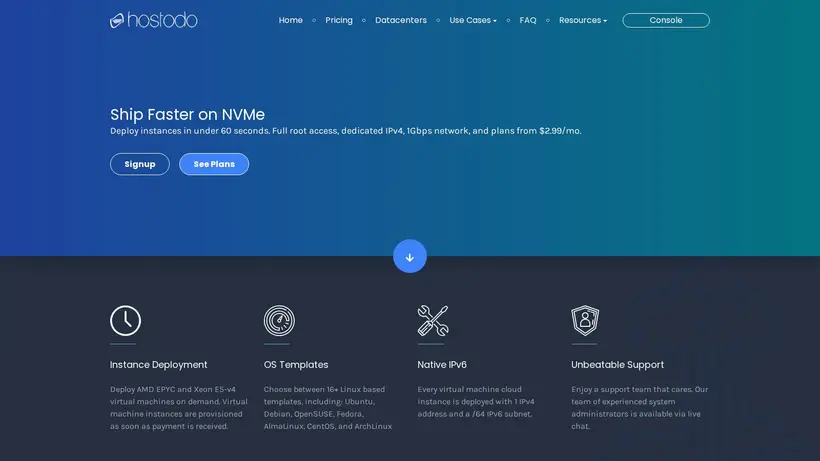
Hostodo Savings Guide for VPS Hosting
Hostodo listings suit shoppers comparing unmanaged KVM VPS hosting for development, testing, websites, and infrastructure projects. The crawled source describes full-root instances, NVMe-backed storage on AMD EPYC 7742 nodes, dedicated IPv4, /64 IPv6, and a 1 Gbps network. Our page adds editorial offer listings, so treat each promotion as a starting point for comparison rather than a brand-side guarantee.
If you are choosing between a small test server and a more capable production setup, begin with RAM, CPU, storage, transfer needs, and region. Then check whether the offer matches the selected plan and billing term. That simple order prevents a tempting headline from distracting you from the configuration your project actually needs.
How our Save 20% Forever on AMD EPYC listing can help shoppers
The current editorial listing highlights a 20% recurring discount on AMD EPYC 7742 KVM VPS plans. It may appeal to shoppers who want newer hardware and sustained pricing rather than a one-time introductory reduction. Read the listing details beside the selected configuration, because a recurring discount still depends on the eligible plan and checkout conditions shown by the provider.
Hostodo’s crawled material describes instant provisioning and full root control. That combination can suit a developer deploying a clean environment, a learner testing server administration, or a small team separating web, API, and worker workloads. The provider also describes NVMe storage and up to 450,000 IOPS per instance. Use those points to frame your comparison, not to assume every configuration delivers identical results.
When to compare 70% Off before checkout
The editorial page includes a 70% Off listing alongside several older VPS promotions. A larger percentage is not automatically the better choice: the plan size, annual or monthly billing, virtualization type, region, and included resources can matter more than the headline. For a lightweight test, a small KVM or OpenVZ configuration may be enough. For containers, sustained workloads, or multiple services, compare CPU, RAM, storage, and network details first.
Hostodo also describes annual plans as including two months free, while the listing archive contains offers tied to particular plans or terms. Check the selected product before copying a coupon code. If the price changes after applying it, remove unrelated add-ons, confirm the billing cycle, and compare the final total again. The safer decision is the offer that remains useful after those checks, not simply the one with the largest advertised percentage.
Hostodo Savings Questions
Hostodo listings on this editorial page cover VPS hosting offers gathered for shoppers comparing server configurations and pricing. The provider’s crawled material describes unmanaged KVM instances with root access, NVMe storage, AMD EPYC hardware, dedicated IPv4, IPv6, and a 1 Gbps network. Listings may target different plans, billing cycles, or customer types, so the percentage alone is not enough. Check the selected configuration, apply any code carefully, and verify the final checkout total before paying. Older entries can help with price context, but they should not be treated as current brand statements or guarantees.